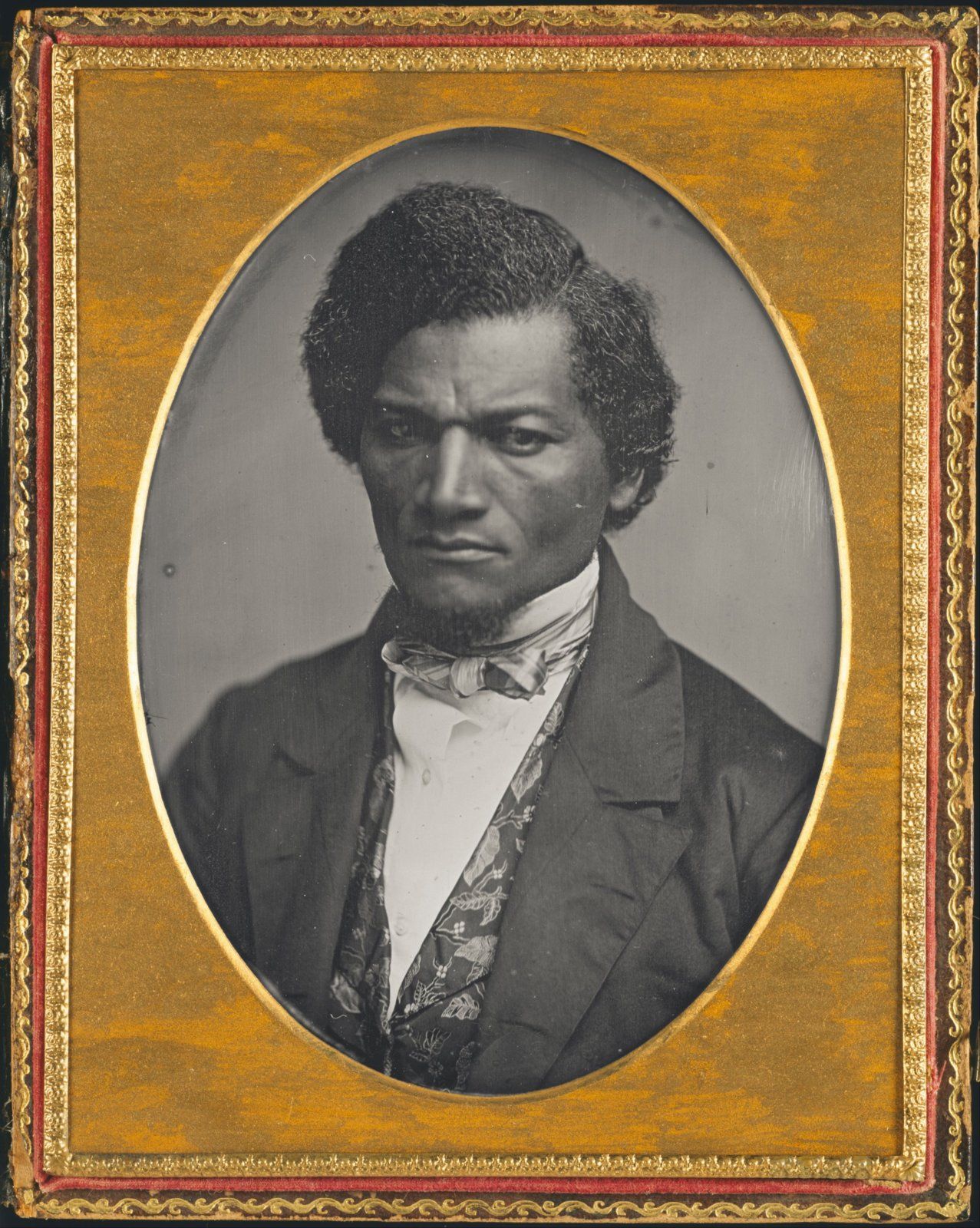
Frederick Douglass

civilwarincolor

2nd Lieutenant
Joined
Oct 27, 2012
Location
California
I wanted to work a bit on restoration for this image so have a look at the original to see the changes. Basically in the original the image was a Daguerreotype, which means that it was reversed, so I flipped it back. Then I wanted to see about getting rid of the frame, so I expanded the lines of the body and clothing to bring it down to a flat, rather than oval bottom.

I would love to know of the reaction to the restoration.

I10044_w.jpg


Original:

Image12.jpg
 
Last edited by a moderator:
Very good job. You can see the intensity and drive this great man possessed.

Looks great. The determined nature of the man is quite apparent.

Thank you both. I agree that the he looks quite determined in the image. I can only imagine what he must have been like in person. I had done an image of him before, but post war and later in life. I wanted to do this one of him at the time when he was young and just making a name for himself.
 
I like the colors and the intensity, though it feels very clean to me..I can't quite pin-point it. My main critique is the the eye whites are very opaque and as a result, the eyes are flattened. I would reduce their opacity, and whiteness and work back into the eye corners with some red, working back the roundness of the eyes. The pupils don't have their highlights and are also flattened out. personally, I would work more into the shadows overall. See if you can give the tie a "place". it floats (through no fault of yours, it's odd in the image,) but maybe some depth would help it..That's all.
 
I wanted to work a bit on restoration for this image so have a look at the original to see the changes. Basically in the original the image was a Daguerreotype, which means that it was reversed, so I flipped it back. Then I wanted to see about getting rid of the frame, so I expanded the lines of the body and clothing to bring it down to a flat, rather than oval bottom.

I would love to know of the reaction to the restoration.

I10044_w.jpg

I like this a lot. The whites of the eyes could use some work, though,to look more natural. The lips have a little too much rouge for my taste. Other than that, this is a great image.

- Alan
 
Last edited by a moderator:
I like the colors and the intensity, though it feels very clean to me..I can't quite pin-point it. My main critique is the the eye whites are very opaque and as a result, the eyes are flattened. I would reduce their opacity, and whiteness and work back into the eye corners with some red, working back the roundness of the eyes. The pupils don't have their highlights and are also flattened out. personally, I would work more into the shadows overall. See if you can give the tie a "place". it floats (through no fault of yours, it's odd in the image,) but maybe some depth would help it..That's all.

I like this a lot. The whites of the eyes could use some work, though,to look more natural. The lips have a little too much rouge for my taste. Other than that, this is a great image.

- Alan

Thank you both for your comments. I agree with the comments on the whites of the eyes. It did cause me some issues when I was working on it. If you look at the original it was a bit dark and more "menacing" I tried adjusting the brightness levels, but ended up with eyes that had more gray than white in them.

I will try playing with them some more and see if I can keep the same quality that the original image had with the other changes I wanted.
 
I like the colors and the background. Excellent! It is difficult to add missing areas but I think his right shoulder seam should be extended and the upper sleeve rounded a little.

I10044_w.jpg

Interest in your thoughts, cwic.
 
Thank you both for your comments. I agree with the comments on the whites of the eyes. It did cause me some issues when I was working on it. If you look at the original it was a bit dark and more "menacing" I tried adjusting the brightness levels, but ended up with eyes that had more gray than white in them.

I will try playing with them some more and see if I can keep the same quality that the original image had with the other changes I wanted.
Couple of thoughts on that:
You could use the dodge tool a bit on the whites. I would copy the eye area to the layer above so as not to damage the original. And mask it. Another way to lighten that one area is select and mask it and apply your curve adjustment layer to just that masked part. Then blend your color to it.
 
I like the colors and the background. Excellent! It is difficult to add missing areas but I think his right shoulder seam should be extended and the upper sleeve rounded a little.

View attachment 81443
Interest in your thoughts, cwic.

Mike -

Thanks so much for your comments. I thought about this when I was doing it and played with it a bit to try and get it right. I am trying to work on some of my restoration technique and see what is possible. I do think you are right that it could probably be moved out a bit and give it a bit more of a curve. I did it 2-3 times to get it where it is and am always a bit concerned am I going to far or not enough. It helps to hear another opinion.
 
Couple of thoughts on that:
You could use the dodge tool a bit on the whites. I would copy the eye area to the layer above so as not to damage the original. And mask it. Another way to lighten that one area is select and mask it and apply your curve adjustment layer to just that masked part. Then blend your color to it.

DJenne -

Have a look at the closeup below of the eyes as I posted it above. I think it helps when you can see the original B&W next to the color. As you can see in the original the eyes are much darker. I did mask and lighten as you suggested, that is in the version I posted already. As you can see it needs work. I think that the area around the eyes needs to be darker, not lighter. The area of the pupil is fairly easy to fix, but the entire eye area has now lost it's emphasis being to light for the rest of the eye.

Douglass_eyes.jpg
 
Mike -

Thanks so much for your comments. I thought about this when I was doing it and played with it a bit to try and get it right. I am trying to work on some of my restoration technique and see what is possible. I do think you are right that it could probably be moved out a bit and give it a bit more of a curve. I did it 2-3 times to get it where it is and am always a bit concerned am I going to far or not enough. It helps to hear another opinion.
I'm not an artist and it is very difficult to repair missing areas. Light, depth, shading, etc. I would never attempt what do did with this photo.
 
I'm not an artist and it is very difficult to repair missing areas. Light, depth, shading, etc. I would never attempt what you did with this photo.

Thanks Mike. Other than what I have learned on my own in the last few years I have no background in art either. I appreciate you and others that give me criticism like this that I can use. It is one thing to color a photograph, but creating a shoulder is another.

Recently I was working on a 1890's image for a client and had to recreate most of a palm tree. That was a challenge as well, but I think doing something on the human body is more of a challenge.

Here is the train image as it was completed.
3c02856_w.jpg


Here is the original LOC image:
3c02856v.jpg
 

Learn About Us
About CivilWarTalk
Contact the Webmaster
Meet the Staff
Link to CivilWarTalk
Join Our Community
Register
Browse Forums
View Today's Discussions
Search the Forum
Get Help
FAQ
Student Guide
Forum Rules & Etiquette
Copyright / DMCA

     Contact Us CivilwarTalk on Facebook CivilWarTalk on YouTube CivilWarTalk on Twitter RSS Feed

Bringing the American Civil War and More to Life.
© 1999 - , CIVILWARTALK, LLC - Site Version 10.0

SlaveryTalk.com - SecessionTalk.com - CivilWarTalk.com - ReconstructionTalk.com
Back
Top