Lt. Gen. Grant

civilwarincolor

2nd Lieutenant
Joined
Oct 27, 2012
Location
California
I have been working recently on more advanced techniques for repairing damage and thought I would share one from this week. Sometimes you have a great photo, but due to the damage you just have to severely crop it or just pass. I thought with this photo I would see if I could make the changes to fix it.

First the original from the National Archives. Note the first problem was easy, the image was flipped left to right. If you look at the way that his buttons are on the jacket you will see that they open backwards and therefore this image should be reversed. Surprised that the National Archives did not catch and fix that one.

Ulysses_S._Grant_-_NARA_-_530601.jpg


After you get past the "flip" the other problems mostly amount to broken glass and a few scratches. The scratches I have been doing for a while, so while it takes a little time, these can be repaired with a little patience. The big problem obviously was to fix the chair. My first issue was to find out what the chair looked like. Since this was taken at the Brady studio I had a look through a few hundred Brady images to find this chair being used many times over the years.

With a good idea of what the chair looked like I broke it into three parts, the upper arm, the seat cushion and the bottom fringe. For the upper arm I continued the curve to the edge of the image and then dropped it down to capture the fringe area for the arm rest. With this done I moved to the seat. I had to try this a few times to get a seat that looked to be of the right size and then replicate the look of the seat. The bottom fringe was done by replicating it around the area below the seat.

While it is not perfect (in my opinion) I think it is so much better than what was there before. I am very happy with the results. Not sure if I will attempt something like this on all future damaged images, but the more I learn, the better I can get.

Hope you enjoy:
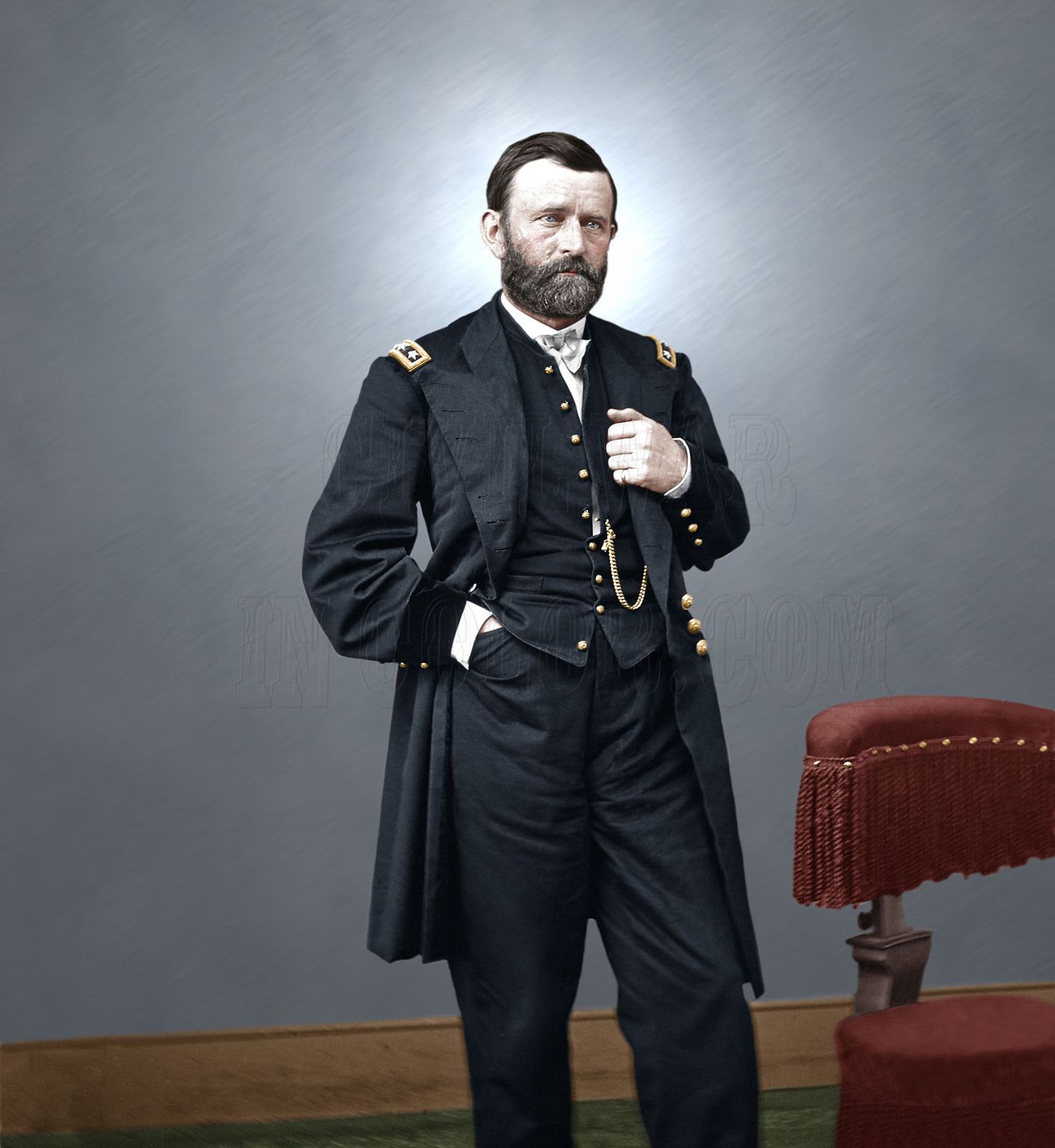
530601_w.jpg
 
I have been working recently on more advanced techniques for repairing damage and thought I would share one from this week. Sometimes you have a great photo, but due to the damage you just have to severely crop it or just pass. I thought with this photo I would see if I could make the changes to fix it.

First the original from the National Archives. Note the first problem was easy, the image was flipped left to right. If you look at the way that his buttons are on the jacket you will see that they open backwards and therefore this image should be reversed. Surprised that the National Archives did not catch and fix that one.

Ulysses_S._Grant_-_NARA_-_530601.jpg


After you get past the "flip" the other problems mostly amount to broken glass and a few scratches. The scratches I have been doing for a while, so while it takes a little time, these can be repaired with a little patience. The big problem obviously was to fix the chair. My first issue was to find out what the chair looked like. Since this was taken at the Brady studio I had a look through a few hundred Brady images to find this chair being used many times over the years.

With a good idea of what the chair looked like I broke it into three parts, the upper arm, the seat cushion and the bottom fringe. For the upper arm I continued the curve to the edge of the image and then dropped it down to capture the fringe area for the arm rest. With this done I moved to the seat. I had to try this a few times to get a seat that looked to be of the right size and then replicate the look of the seat. The bottom fringe was done by replicating it around the area below the seat.

While it is not perfect (in my opinion) I think it is so much better than what was there before. I am very happy with the results. Not sure if I will attempt something like this on all future damaged images, but the more I learn, the better I can get.

Hope you enjoy:

530601_w.jpg
Very good! The watch was invariably worn on the left side.
 
The negative was, on glass, some distance from the print. Turn the negative over and the distance is gone. So we have, almost always, flopped prints from a glass negative.
 
Wow! Excellent work on the cleanup. I would never even try to fix the chair. Good job. National Archives' Dr. Mary Walker photo (#526308) has a full view of the chair. (At least I think it is the same chair.) It appears the back is height is adjustable.

To nitpick, I think the light behind his head overpowers his face a little. My eyes get averted to the wall just right of his face. That is his left.
526308a.jpg
 
The negative was, on glass, some distance from the print. Turn the negative over and the distance is gone. So we have, almost always, flopped prints from a glass negative.

You are correct, my point is that when you review the images from the National Archives (NARA) and the Library of Congress most of their digital scans of negatives have already been flipped when they are posted. This is the first time that I have had to flip one from a negative. When they are images that came from a daguerreotype or tintype then they are all displayed in a mirror image. Just odd that this one was not corrected by the NARA.
 
Wow! Excellent work on the cleanup. I would never even try to fix the chair. Good job. National Archives' Dr. Mary Walker photo (#526308) has a full view of the chair. (At least I think it is the same chair.) It appears the back is height is adjustable.

To nitpick, I think the light behind his head overpowers his face a little. My eyes get averted to the wall just right of his face. That is his left.
View attachment 62371

I agree with Mike Serpa that the halo is a little distracting. Very nice job on the cleanup otherwise.

Thanks so much for your comments on the repair job. It was a real challenge to see if I could make this happen. I used the Pen tool to map out the area for each of the major components and then converted that mapping to a selection that allowed me to be able to clone other parts of the image without having to worry about going outside of the boundaries. It also allowed me to have more defined, sharper edge when it came to the end of that element. After that it was filling in other missing gaps until it looked real.

As for the background with the "halo" image, This is a personal preference thing I have done since the first colorization images I did about five years ago. I did it for consistency of my images. I also keep each of the images in a state without the "halo" and have offered them that way when requested.

As for the chair, yes, Dr. Walker was one of my main references I had done her a few years ago. I also found about a dozen other full or partial images with the chair, here are a few:

Dr. Walker:
p1417226722-6.jpg


I also found a good side view of the chair with John Surratt Jr.:

p1318408530-6.jpg


Major Rathbone:
p1318406316-6.jpg


Dr. Leale:
p310201717-6.jpg


and finally another one of Grant in Brady's Studio (I have not done this one yet). When you compare the full size copy of this image with the others it is clear that the chair is well worn and missing fabric on the corner of the arm cushion. The other images had been taken during the war, but this image was taken while Grant was a 4 star general. While I don't have a specific date for the photograph I believe it was taken just shortly before he became president either late 1868 or early 1869.
00001v.jpg
 
I agree with Mike Serpa that the halo is a little distracting. Very nice job on the cleanup otherwise.
If I might add a comment intended in the most helpful spirit possible: I think your rendering of the background leaves Gen. Grant with very hard edges all around his head and torso. This effect is not present on those edges of his uniform from the waist down. The overall effect above the waist gives him a somewhat "cut and pasted" look over the background. Note how this effect is not present in the original glass plate print. (Yes, the edges are somewhat hard there, but not nearly as hard as in your retouched image).

I mean these comments in the best possible spirit, but I make them from the perspective of a career advertising art director who had to deal with these problems long before, and long after, we had digital technology. I still deal with them weekly, even in contemporary photography.

First, lose the halo effect behind his head (unless your objective is to deify him, in which case it's probably appropriate for your purposes), then soften all edges. Then I think you will MUCH prefer the way your image looks. Please give it a try.

Best of luck on this one. You have some excellent retouching talent, but don't go overboard with it. Keep it looking real. See what I mean?
 
If I might add a comment intended in the most helpful spirit possible: I think your rendering of the background leaves Gen. Grant with very hard edges all around his head and torso. This effect is not present on those edges of his uniform from the waist down. The overall effect above the waist gives him a somewhat "cut and pasted" look over the background. Note how this effect is not present in the original glass plate print. (Yes, the edges are somewhat hard there, but not nearly as hard as in your retouched image).

I mean these comments in the best possible spirit, but I make them from the perspective of a career advertising art director who had to deal with these problems long before, and long after, we had digital technology. I still deal with them weekly, even in contemporary photography.

First, lose the halo effect behind his head (unless your objective is to deify him, in which case it's probably appropriate for your purposes), then soften all edges. Then I think you will MUCH prefer the way your image looks. Please give it a try.

Best of luck on this one. You have some excellent retouching talent, but don't go overboard with it. Keep it looking real. See what I mean?

Thanks for your comments, I know some like it, some don't, I don't take it personal.

I've sold them both ways. If you look at the other examples of the color images that I showed on this page I have the same "halo" for all images, just something I started a long time ago on all images that I have replaced the background on. I am just trying to stay consistent with the rest of my collection.
 

Learn About Us
About CivilWarTalk
Contact the Webmaster
Meet the Staff
Link to CivilWarTalk
Join Our Community
Register
Browse Forums
View Today's Discussions
Search the Forum
Get Help
FAQ
Student Guide
Forum Rules & Etiquette
Copyright / DMCA

     Contact Us CivilwarTalk on Facebook CivilWarTalk on YouTube CivilWarTalk on Twitter RSS Feed

Bringing the American Civil War and More to Life.
© 1999 - , CIVILWARTALK, LLC - Site Version 10.0

SlaveryTalk.com - SecessionTalk.com - CivilWarTalk.com - ReconstructionTalk.com
Back
Top