
- Joined
- Oct 4, 2013
I took your advice and got it. How are you accessing historical maps as pictured in your post above? It looks cool, but I'm wondering whether I'm smart enough to operate the thing!
Hey there. So depending on your area if you go to 'more maps' it should give you a list of available maps starting closest to you and going from there. @Chattahooch33 and I (mostly him) have added a ton of GA and VA battlefields. It takes your gps location and shows you where you are currently on the old maps. This has been great for battlefield touring, driving, relic hunting and looking for old home sites. Also you start seeing why certain ridges that still exist today were such prominent defenses then, depending where you are.
You can also create your own maps and there should be a tutorial. If not I will try to help you.
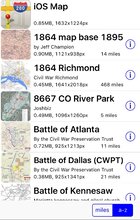
But for now, go to "select map" in the upper left hand corner. You'll see a list of maps you have downloaded, that looks similar to this:
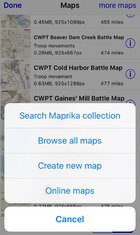
Since you prob don't have any downloaded yet select 'more maps' in the upper right hand corner where you can search by name, browse ALL maps, or create your own, etc.




 Bringing the